 eSIMratCompare
eSIM compatible phones: the full 2026 list
Phone, tablet, watch or laptop: check in seconds whether your device supports eSIM. 236+ models listed, from the latest iPhone to a second-hand Redmi.
Type your model and get the verdict straight away.
Even when it is eSIM compatible, a device can still be locked by its carrier. Check that yours is unlocked before you buy a plan.
The full list of eSIM compatible devices
The list of compatible devices, by category then by brand: find your model or use the search above. eSIM compatible smartphones marked ✅ are officially supported.
eSIM is available on every iPhone since late 2018 and on most recent mid-range and high-end Android phones (Samsung Galaxy, Google Pixel, Xiaomi, Motorola, Sony, Honor, OnePlus and more).
iiPhone34 models
- iPhone AirException: units bought in mainland China have no eSIM (apart from the iPhone 17e and iPhone Air).
- iPhone 17 Pro MaxException: units bought in mainland China have no eSIM (apart from the iPhone 17e and iPhone Air).
- iPhone 17 ProException: units bought in mainland China have no eSIM (apart from the iPhone 17e and iPhone Air).
- iPhone 17eException: units bought in mainland China have no eSIM (apart from the iPhone 17e and iPhone Air).
- iPhone 17Exception: units bought in mainland China have no eSIM (apart from the iPhone 17e and iPhone Air).
- iPhone 16eException: units bought in mainland China have no eSIM (apart from the iPhone 17e and iPhone Air).
- iPhone 16 Pro MaxException: units bought in mainland China have no eSIM (apart from the iPhone 17e and iPhone Air).
- iPhone 16 ProException: units bought in mainland China have no eSIM (apart from the iPhone 17e and iPhone Air).
- iPhone 16 PlusException: units bought in mainland China have no eSIM (apart from the iPhone 17e and iPhone Air).
- iPhone 16Exception: units bought in mainland China have no eSIM (apart from the iPhone 17e and iPhone Air).
- iPhone 15 Pro MaxException: units bought in mainland China have no eSIM (apart from the iPhone 17e and iPhone Air).
- iPhone 15 ProException: units bought in mainland China have no eSIM (apart from the iPhone 17e and iPhone Air).
- iPhone 15 PlusException: units bought in mainland China have no eSIM (apart from the iPhone 17e and iPhone Air).
- iPhone 15Exception: units bought in mainland China have no eSIM (apart from the iPhone 17e and iPhone Air).
- iPhone SE 3 (2022)Exception: units bought in mainland China have no eSIM (apart from the iPhone 17e and iPhone Air).
- iPhone 14 Pro MaxException: units bought in mainland China have no eSIM (apart from the iPhone 17e and iPhone Air).
- iPhone 14 ProException: units bought in mainland China have no eSIM (apart from the iPhone 17e and iPhone Air).
- iPhone 14 PlusException: units bought in mainland China have no eSIM (apart from the iPhone 17e and iPhone Air).
- iPhone 14Exception: units bought in mainland China have no eSIM (apart from the iPhone 17e and iPhone Air).
- iPhone 13 Pro MaxException: units bought in mainland China have no eSIM (apart from the iPhone 17e and iPhone Air).
- iPhone 13 ProException: units bought in mainland China have no eSIM (apart from the iPhone 17e and iPhone Air).
- iPhone 13 miniException: units bought in mainland China have no eSIM (apart from the iPhone 17e and iPhone Air).
- iPhone 13Exception: units bought in mainland China have no eSIM (apart from the iPhone 17e and iPhone Air).
- iPhone SE 2 (2020)Exception: units bought in mainland China have no eSIM (apart from the iPhone 17e and iPhone Air).
- iPhone 12 Pro MaxException: units bought in mainland China have no eSIM (apart from the iPhone 17e and iPhone Air).
- iPhone 12 ProException: units bought in mainland China have no eSIM (apart from the iPhone 17e and iPhone Air).
- iPhone 12 miniException: units bought in mainland China have no eSIM (apart from the iPhone 17e and iPhone Air).
- iPhone 12Exception: units bought in mainland China have no eSIM (apart from the iPhone 17e and iPhone Air).
- iPhone 11 Pro MaxException: units bought in mainland China have no eSIM (apart from the iPhone 17e and iPhone Air).
- iPhone 11 ProException: units bought in mainland China have no eSIM (apart from the iPhone 17e and iPhone Air).
- iPhone 11Exception: units bought in mainland China have no eSIM (apart from the iPhone 17e and iPhone Air).
- iPhone XRException: units bought in mainland China have no eSIM (apart from the iPhone 17e and iPhone Air).
- iPhone XS MaxException: units bought in mainland China have no eSIM (apart from the iPhone 17e and iPhone Air).
- iPhone XSException: units bought in mainland China have no eSIM (apart from the iPhone 17e and iPhone Air).
SSamsung52 models
- Galaxy S25 UltraSupport varies by country of sale: check the EID by dialling *#06#.
- Galaxy S25+Support varies by country of sale: check the EID by dialling *#06#.
- Galaxy S25Support varies by country of sale: check the EID by dialling *#06#.
- Galaxy S25 EdgeSupport varies by country of sale: check the EID by dialling *#06#.
- Galaxy S24 UltraSupport varies by country of sale: check the EID by dialling *#06#.
- Galaxy S24+Support varies by country of sale: check the EID by dialling *#06#.
- Galaxy S24Support varies by country of sale: check the EID by dialling *#06#.
- Galaxy S24 FESupport varies by country of sale: check the EID by dialling *#06#.
- Galaxy S23 UltraSupport varies by country of sale: check the EID by dialling *#06#.
- Galaxy S23+Support varies by country of sale: check the EID by dialling *#06#.
- Galaxy S23Support varies by country of sale: check the EID by dialling *#06#.
- Galaxy S23 FESupport varies by country of sale: check the EID by dialling *#06#.
- Galaxy S22 UltraSupport varies by country of sale: check the EID by dialling *#06#.
- Galaxy S22+Support varies by country of sale: check the EID by dialling *#06#.
- Galaxy S22Support varies by country of sale: check the EID by dialling *#06#.
- Galaxy S21 UltraSupport varies by country of sale: check the EID by dialling *#06#.
- Galaxy S21+Support varies by country of sale: check the EID by dialling *#06#.
- Galaxy S21Support varies by country of sale: check the EID by dialling *#06#.
- Galaxy S21 FESupport varies by country of sale: check the EID by dialling *#06#.
- Galaxy S20 UltraSupport varies by country of sale: check the EID by dialling *#06#.
- Galaxy S20+Support varies by country of sale: check the EID by dialling *#06#.
- Galaxy S20Support varies by country of sale: check the EID by dialling *#06#.
- Galaxy S20 FESupport varies by country of sale: check the EID by dialling *#06#.
- Galaxy Note 20 UltraSupport varies by country of sale: check the EID by dialling *#06#.
- Galaxy Note 20Support varies by country of sale: check the EID by dialling *#06#.
- Galaxy Z Fold 7Support varies by country of sale: check the EID by dialling *#06#.
- Galaxy Z Fold 6Support varies by country of sale: check the EID by dialling *#06#.
- Galaxy Z Fold 5Support varies by country of sale: check the EID by dialling *#06#.
- Galaxy Z Fold 4Support varies by country of sale: check the EID by dialling *#06#.
- Galaxy Z Fold 3Support varies by country of sale: check the EID by dialling *#06#.
- Galaxy Z Fold 2Support varies by country of sale: check the EID by dialling *#06#.
- Galaxy Z FoldSupport varies by country of sale: check the EID by dialling *#06#.
- Galaxy Z Flip 7Support varies by country of sale: check the EID by dialling *#06#.
- Galaxy Z Flip 6Support varies by country of sale: check the EID by dialling *#06#.
- Galaxy Z Flip 5Support varies by country of sale: check the EID by dialling *#06#.
- Galaxy Z Flip 4Support varies by country of sale: check the EID by dialling *#06#.
- Galaxy Z Flip 3Support varies by country of sale: check the EID by dialling *#06#.
- Galaxy Z Flip 5GSupport varies by country of sale: check the EID by dialling *#06#.
- Galaxy Z FlipSupport varies by country of sale: check the EID by dialling *#06#.
- Galaxy S25 FESupport varies by country of sale: check the EID by dialling *#06#.
- Galaxy S25 SlimSupport varies by country of sale: check the EID by dialling *#06#.
- Galaxy S26Support varies by country of sale: check the EID by dialling *#06#.
- Galaxy Z Flip 7 FESupport varies by country of sale: check the EID by dialling *#06#.
- Galaxy Z TriFoldSupport varies by country of sale: check the EID by dialling *#06#.
- Galaxy A56Support varies by country of sale: check the EID by dialling *#06#.
- Galaxy A55 5GSupport varies by country of sale: check the EID by dialling *#06#.
- Galaxy A54 5GSupport varies by country of sale: check the EID by dialling *#06#.
- Galaxy A36Support varies by country of sale: check the EID by dialling *#06#.
- Galaxy A35 5GSupport varies by country of sale: check the EID by dialling *#06#.
- Galaxy A23 5GSupport varies by country of sale: check the EID by dialling *#06#.
- Galaxy A17Support varies by country of sale: check the EID by dialling *#06#.
- Galaxy XCover7Support varies by country of sale: check the EID by dialling *#06#.
- Other Galaxy A modelsDepends on the model and the market: check with *#06#.
GGoogle24 models
- Pixel 10 Pro XL
- Pixel 10 Pro
- Pixel 10
- Pixel 9a
- Pixel 9 Pro Fold
- Pixel 9 Pro XL
- Pixel 9 Pro
- Pixel 9
- Pixel 8a
- Pixel 8 Pro
- Pixel 8
- Pixel Fold
- Pixel 7a
- Pixel 7 Pro
- Pixel 7
- Pixel 6a
- Pixel 6 Pro
- Pixel 6
- Pixel 5a
- Pixel 5
- Pixel 4a 5G
- Pixel 4a
- Pixel 4 XL
- Pixel 4
- Pixel 2 / 3 / 3aeSIM limited to certain carriers on these generations.
XXiaomi / Redmi / Poco18 models
- Xiaomi 17T
- Xiaomi 15T Pro
- Xiaomi 15T
- Xiaomi 15
- Xiaomi 14T Pro
- Xiaomi 14T
- Xiaomi 14
- Xiaomi 13T Pro
- Xiaomi 13T
- Xiaomi 13
- Xiaomi 12T Pro
- Poco F8
- Poco X7
- Redmi Note 15 Pro 5G
- Redmi Note 14 Pro+
- Redmi Note 14Support varies by country of sale: check the EID by dialling *#06#.
- Redmi Note 13Support varies by country of sale: check the EID by dialling *#06#.
- Redmi Note 11 Pro 5GSupport varies by country of sale: check the EID by dialling *#06#.
- Other Xiaomi / Redmi / Poco modelsMany models are still physical SIM only: check with *#06#.
MMotorola20 models
- Razr 60 Ultra
- Razr 60
- Razr 50 Ultra
- Razr 50
- Razr 40 Ultra
- Razr 40
- Razr 5G (2020)
- Razr (2019)
- Edge 60 Ultra
- Edge 60 Pro
- Edge 50 Ultra
- Edge 50 Pro
- Edge 40 Pro
- Edge 60
- Edge 50
- Edge 40
- Razr+
- Moto G (2024 / 2025)
- Moto G Stylus
- ThinkPhone 25
- Older Moto G modelsDepends on the model and the market: check with *#06#.
SSony9 models
- Xperia 1 VII
- Xperia 1 VI
- Xperia 1 V
- Xperia 5 V
- Xperia 5 IV
- Xperia 10 VI
- Xperia 10 V
- Xperia 10 IV
- Xperia Ace III
HHonor8 models
- Magic 8
- Magic 7 Pro
- Magic 6 Pro
- Magic V
- Honor 600
- Honor 400
- Honor 300 Pro
- Honor 200
- Other Honor models
OOppo11 models
- Find X9
- Find X8 Pro
- Find X8
- Find X5
- Find X3
- Find N3
- Find N
- Reno 15
- Reno 14 Pro
- Reno 14
- A55s 5G
- Other Oppo models
HHuawei5 models
- Mate 80 / 80 Pro / 80 Pro+ / 80 Ultra
- Mate 40 Pro
- Pura X
- Pura 70 / 70 Pro
- P40 / P40 Pro
- Other Huawei models
OOnePlus5 models
- OnePlus 15
- OnePlus 13
- OnePlus 12
- OnePlus 11
- OnePlus Open
VVivo3 models
- X300
- X200
- X100
- V seriesDepends on the model and the market: check with *#06#.
NNothing2 models
- Phone 3
- Phone 3a
NNokia3 models
- XR21
- X30
- G60
FFairphone2 models
- Fairphone 5
- Fairphone 4
CCrosscall1 model
- Stellar-M6
RRealme1 model
- Realme 14
- Other Realme modelsDepends on the model and the market: check with *#06#.
SSharp3 models
- Recent Aquos RSupport varies by country of sale: check the EID by dialling *#06#.
- Aquos sense (4 lite to 9)Support varies by country of sale: check the EID by dialling *#06#.
- Aquos zero6 / wish / wish 2 / wish 3Support varies by country of sale: check the EID by dialling *#06#.
AASUS1 model
- Zenfone 12
- Other ASUS / ROG Phone modelsDepends on the model: check with *#06#.
ZZTE / nubia1 model
- nubia Flip 2
- Other ZTE models
TTCL1 model
- Recent TCL (model dependent)Check the spec sheet for the exact model, or dial *#06#.
RRakuten1 model
- Rakuten Hand / Big (Japanese market)Support varies by country of sale: check the EID by dialling *#06#.
OOther brands7 models
- Microsoft Surface Duo / Duo 2
- T-Mobile Revvl 7
- Nuu X5
- Gemini PDA 4G+Wi-Fi
- Doogee V30
- Alcatel V3
- Trump Mobile T1
- Hammer, Oukitel and other rugged modelsDepends on the model: check with *#06#.
How do you check whether your phone is eSIM compatible?
Two reliable methods, nothing to install. The first: dial *#06# on the phone keypad. If an EID number appears (a 32-digit identifier), your phone has the eSIM module; if you only see the IMEI, it does not. This is the universal test, and it works on iPhone and Android alike.
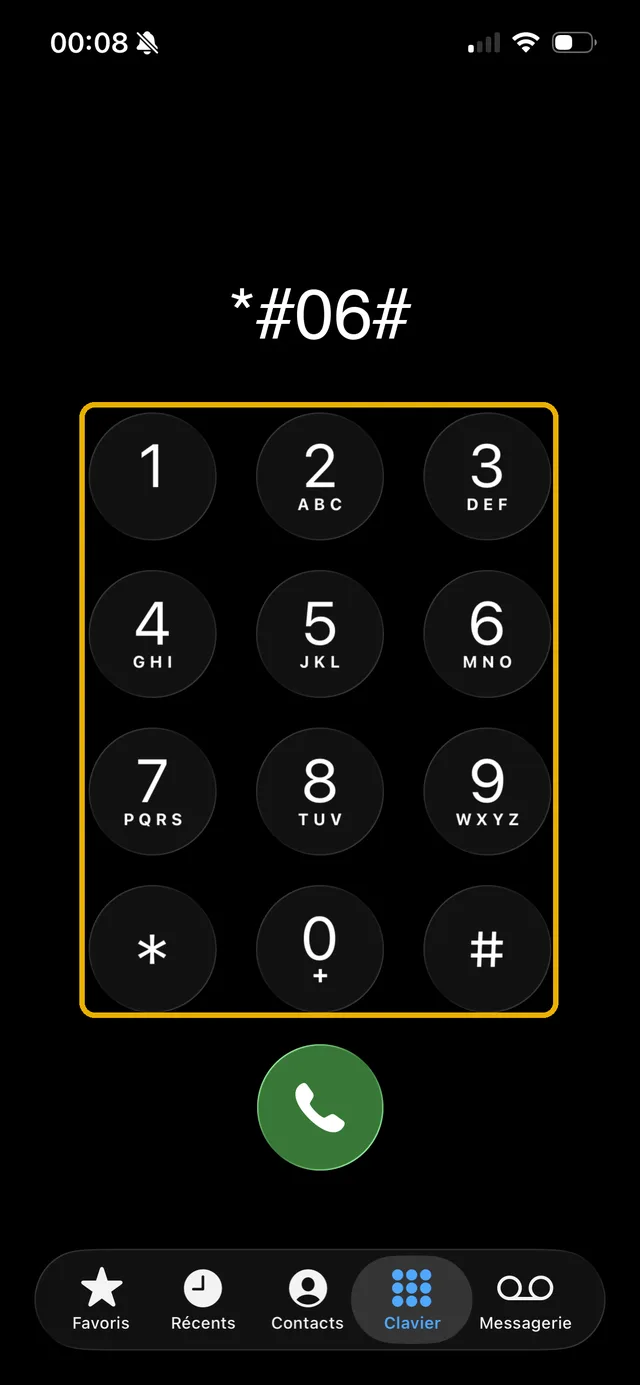
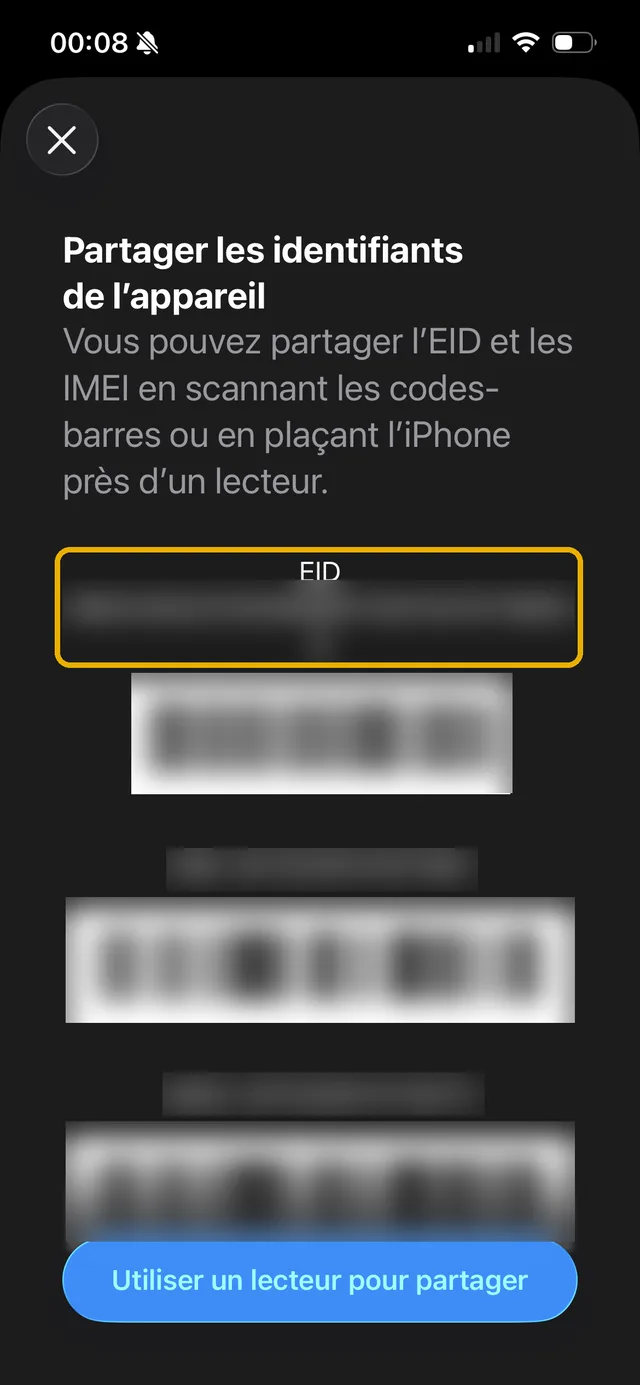
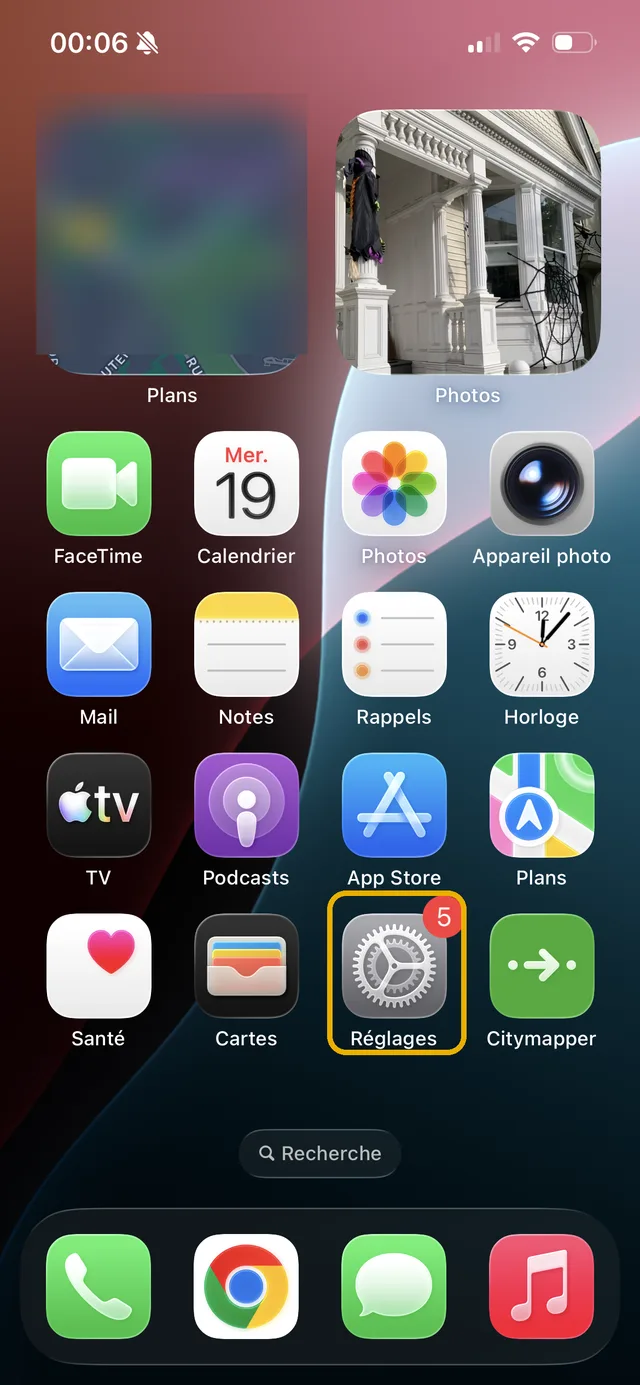
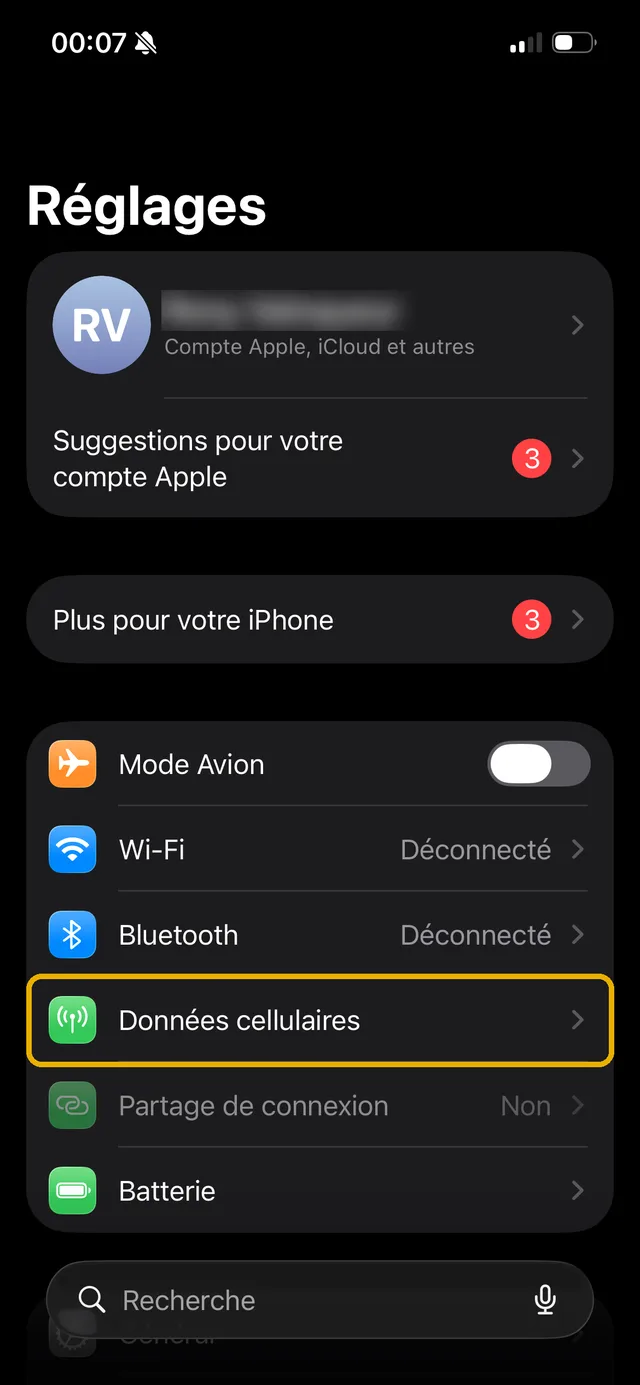
The second: head into the settings. On iPhone, open Settings then Cellular (or Mobile Service): an "Add eSIM" option confirms compatibility. On Android, search for "SIM" in the settings: an "Add eSIM" or "Download a SIM" entry does the same job. If neither option is there, the device has no eSIM module.
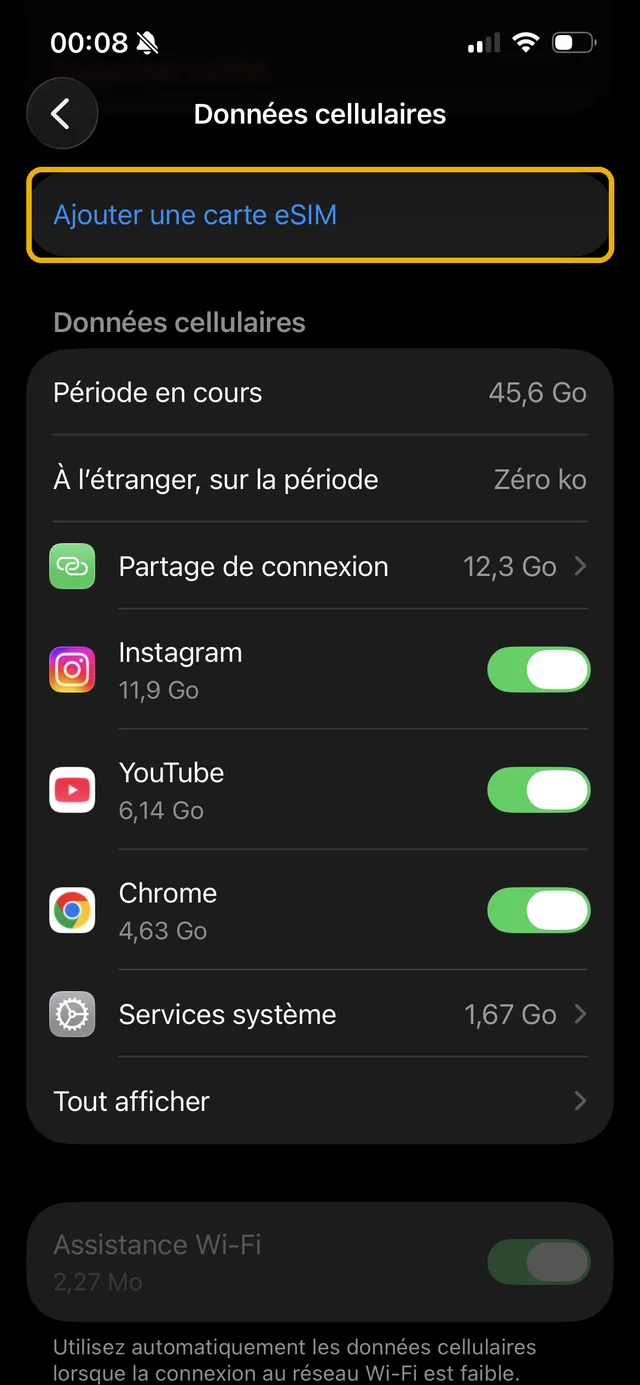
One last point people forget: a compatible phone also has to be carrier-unlocked to accept an eSIM from another operator or a travel provider. On iPhone, "No SIM restrictions" under Settings, General, About confirms you are clear.
Which phones are eSIM compatible? The list by brand
The general rule, if you would rather not check model by model: almost every mid-range and high-end smartphone released since 2019 supports eSIM, on Apple and Android alike. Brand by brand, in detail:
eSIM compatible phones at Apple: iPhone
Every iPhone since late 2018: iPhone XS, XS Max, XR, the 11 through 17 series, SE 2020 and 2022, iPhone 16e and 17e, right up to the iPhone Air sold with no SIM tray at all. Exceptions: units bought in mainland China, and the iPhone X, 8 and earlier. Note that US models from the iPhone 14 onwards are eSIM-only, with no SIM tray.
Which Samsung phones take an eSIM?
The list of eSIM compatible Samsung models covers the Galaxy S20 to S26 (every variant), the Galaxy Note 20, the Z Fold and Z Flip foldables, and recent Galaxy A models (A55, A56, A54, A35). Watch out for regional variants: the same Samsung that supports eSIM in Europe can ship without it in other markets, so the *#06# test remains the final word.
Google Pixel
Consistent support from the Pixel 4 through to the Pixel 10, Pro and a variants included. The Pixel 2 and 3 have an eSIM limited to certain carriers, so check those case by case.
Xiaomi and Redmi
Xiaomi came to eSIM later: count on the Xiaomi 13, 13T Pro, 14T Pro and 15T Pro, plus the Redmi Note 14 Pro+. Many Redmi models are still physical SIM only, especially at the entry level, so check your exact model before buying an eSIM.
The other brands
Oppo Find (X3 to X9) and recent Oppo Reno, Huawei P40, Mate 40 Pro and Mate 80, Motorola Razr and Motorola Edge (40 to 60), Sony Xperia (recent 1, 5 and 10), Honor Magic (6 to 8), OnePlus (11 to 15, Open), Vivo X100 to X300, Fairphone 4 and 5, Nothing Phone 3, Crosscall Stellar-M6 and Nokia XR21: eSIM has become standard on mid-range and high-end Android devices. When in doubt, the tool above and the *#06# code settle it.
How do you get an eSIM?
Once your device is checked, getting an eSIM takes a few minutes, in three steps. One: choose your eSIM plan. For your main line, carriers let you take an eSIM when you sign up, or swap your physical SIM for one from your account area. For a trip, you buy a prepaid eSIM online for your destination: our comparator lists the plans with the best price per GB. Two: you receive a QR code (or activate directly in the provider's app). Three: you scan the code from your phone settings, the eSIM profile downloads, and your line is live.
No waiting for the post, no fiddling with a tray: activating an eSIM is immediate, wherever you are, as long as you have wifi. If the technology is new to you, our guide on what an eSIM is explains how this virtual SIM card works, from purchase to activation.
What are the benefits of an eSIM?
The first benefit of an eSIM is immediacy: you move to an eSIM with no trip to a shop, no post and no handling, and it activates in a few minutes. Then comes dual SIM: your physical SIM card and an eSIM live side by side on the same handset, two numbers active at once, ideal for separating work from personal use or adding a local data plan abroad without touching your main line.
eSIM technology also brings real flexibility: a phone can store several eSIM profiles and switch between them in the settings, which is handy for travellers who chain destinations together. Impossible to lose or break, it also makes switching carrier simpler. And for frequent travellers it is the anti-roaming weapon: a local eSIM bought online often costs a fraction of out-of-plan roaming charges, as we set out destination by destination in the comparator.
eSIM compatible phones and carriers: what actually matters
Good news: every major carrier now supports eSIM. In the United States, AT&T, T-Mobile and Verizon all provision eSIM profiles, and iPhones sold there since the iPhone 14 have no SIM tray at all. In the UK, EE, Vodafone, O2 and Three do the same, as do the large European and Australian networks. There is no such thing as an "eSIM compatible phone for carrier X": compatibility depends on the handset, not on the network.
Two caveats all the same. A phone bought on contract and subsidised by a carrier can be locked: get it unlocked (usually free once the contract terms are met) before installing another provider's eSIM. And a handful of smaller MVNOs still do not offer eSIM at all, so if you plan to keep your home line on eSIM as well, check with your own operator first.
Is there such a thing as a cheap eSIM compatible phone?
Yes, and you do not need a flagship. New or refurbished, the most affordable ways into eSIM are the iPhone SE 2020 and iPhone XR on the Apple side, the "a" variants of the Google Pixel, the Samsung Galaxy A55 and A56, and the Xiaomi 13 and later on Android. Refurbished is often the best move: an eSIM compatible iPhone 11 or Pixel 6a costs a fraction of its original price.
The trap to avoid on the second-hand market: units imported from mainland China (no eSIM on most iPhones) and Android regional variants that ship without it. Before you pay, ask the seller for a screenshot of the *#06# test. No EID line, no eSIM.
Your phone is compatible? Here is what that means for travel
An eSIM compatible, carrier-unlocked phone works with every travel eSIM provider: Airalo, Holafly, Saily, Ubigi, Nomad, Yesim, voilà and the rest. There is no specific "eSIM compatible phone for Holafly": if your device passes the test above, it works everywhere.
That leaves choosing the right plan for your destination, which is exactly what the comparator does. To place the players: voilà competes on value for money with final prices shown up front, an eSIM that is simple to install with an app that is easy to use, and human customer support available 24/7; others lead on unlimited data or multi-country coverage. The overview is on our eSIM providers compared page, and the prices by destination are in the comparator.
Frequently asked questions
Every iPhone since the XS, XS Max and XR (late 2018), Samsung Galaxy from the S20 onwards, Google Pixel from the Pixel 4, and recent high-end devices from Oppo, Xiaomi, Motorola, Sony, Honor and OnePlus. In practice: a mid-range or high-end smartphone released after 2019 is very likely compatible. The universal test: dial *#06# and look for the EID line.
The main one: if your phone breaks or you switch handsets, you cannot move your line across in 10 seconds the way you would with a physical card. You have to run a transfer or reinstall the profile, sometimes through the carrier. Other limits: a few MVNOs still do not offer it, some eSIM profiles are single-use, and a carrier-locked phone can refuse a third-party eSIM. For everyday use, these count for little against the benefits.
The Galaxy S20, S21, S22, S23, S24 and S25 (every variant), the Note 20 and Note 20 Ultra, the Z Fold 1 to 7 and Z Flip 1 to 7 foldables, and the Galaxy A55 and A56. Watch out for variants by country of sale: some Asian versions of the same range have no eSIM. Check your own unit with *#06#.
To see whether an eSIM is already active on your phone, open the SIM settings (Settings, Cellular on iPhone; Settings, Network and SIM on Android). Each line is listed with its type: "eSIM" or "physical SIM". If what you want to know is whether your phone can take one, dial *#06#: an EID number confirms compatibility.
Yes, that is the whole point of modern dual SIM: the physical card keeps your usual number while an eSIM carries the data, typically when you travel. Most compatible phones handle two active lines at once, and recent models handle two active eSIMs at the same time.
Yes, on recent cellular versions: iPad Pro, iPad Air, recent iPad and iPad mini, the cellular Apple Watch, the Galaxy Watch LTE and several Wear OS watches. The principle is the same as on a phone: an eSIM profile downloaded, with no physical card.
Most compatible phones store several eSIM profiles (often 5 to 8), but the number of lines active at the same time varies: one eSIM plus one physical card on 2018-2020 models, two active eSIMs on more recent ones (iPhone 13 and later, the latest Galaxy and Pixel). You switch between profiles in the settings, with nothing to reinstall.
Yes, refurbishing does not change compatibility: a refurbished iPhone 12 or Galaxy S21 keeps its eSIM module. Two things to check before buying: where the unit came from (models imported from mainland China often have no eSIM) and whether it is carrier-locked. Ask the seller for a screenshot of the *#06# test, or run it yourself on arrival.
Phone compatible? Find your eSIM at the best price
Compare eSIM plans by destination, with prices collected automatically.