 eSIMrat
What is an eSIM? The simple definition, and everything it changes
An eSIM is a SIM card already built into your phone: your plan installs via QR code in two minutes, with no plastic card. Definition, difference with a classic SIM card, step-by-step activation, pros and cons: we explain it all, simply.
eSIM: definition
An eSIM (for "embedded SIM") is a 100% digital SIM card, soldered directly into your phone when it is manufactured. It does exactly the same job as a classic SIM card: identifying your line with a carrier to give you access to calls, texts and mobile internet.
The difference is that there is no plastic card to insert any more. Your plan arrives as an eSIM profile you download by scanning a QR code or through an app, in a few minutes. The standard is defined by the GSMA, the worldwide association of mobile operators: it is the same technology at every carrier and on every compatible phone.
In practice, the eSIM ships in most smartphones released since 2019, iPhone and Android alike, but also in tablets, cellular smartwatches and some laptops. Some recent phones, like the iPhone Air, no longer have a SIM tray at all.
How does an eSIM work?
How it works fits in one sentence: your carrier sends you your plan over the internet, and your phone installs it on its built-in chip. When you subscribe, the carrier or provider generates a unique eSIM profile, most often materialised as a QR code, sometimes pushed automatically through its app.
When you scan that code, the phone downloads the profile and stores it on the eSIM chip. The line then appears in the settings, exactly as if you had just inserted a card: you can call, text and use data. The chip can store several profiles at once (eight or more on a recent iPhone), with one or two active depending on the model: handy to keep your main line and stack travel plans on standby.
One important point: an eSIM profile is generally single-use. Once installed, it is tied to the phone; if you delete it, the same QR code will no longer work and you will need a reissue. That is the main precaution to know, we come back to it in the downsides.
What is the difference between a SIM card and an eSIM?
Both cards provide the same service: carrying your mobile line. All that changes is the medium, and it shows in everyday use:
| Criterion | Physical SIM card | eSIM |
|---|---|---|
| Format | Plastic card (nano-SIM) inserted into a tray | Invisible chip, already built into the phone |
| Getting one | In store or by post (a few days) | Online, received by email in minutes |
| Installation | Open the tray, insert the card | Scan a QR code or use an app |
| Number of lines | One card = one line | Several profiles stored on the same phone |
| When travelling | Buy a local card on site, swap cards | Install a local plan before departure, removing nothing |
| Loss or damage | Possible (misplaced card, damaged tray) | Impossible: nothing to handle |
| Changing phones | Move the card in 10 seconds | Transfer or reinstall the profile, sometimes via the carrier |
In short: the physical SIM card keeps a single practical advantage, moving instantly from one phone to another. On everything else, speed, flexibility, travel, multi-line, the eSIM has taken the lead. That is why carriers and manufacturers alike are gradually moving to all-eSIM.
How do you activate an eSIM? The full walkthrough
Activation takes about two minutes. You need three things: a compatible, unlocked phone, a Wi-Fi connection, and the QR code or activation link supplied at purchase. Here is every method, step by step.
Pick an eSIM plan for your trip
Select your destination on the comparator, compare providers by real price per GB, and buy your plan online. The QR code lands in your inbox within a minute.
Install the eSIM before you leave
At home, on Wi-Fi: scan the QR code or go through the provider's app. Two minutes, stopwatch in hand. Your current SIM card stays where it is.
Your plan activates on arrival
With most providers, validity starts at the first connection on site: you land, the phone latches onto the local network, you are connected.
Activating an eSIM on iPhone
Four possible methods, from the most common to the most specific. The full official walkthrough is also on the Apple support page.
With a QR code (the most common method)
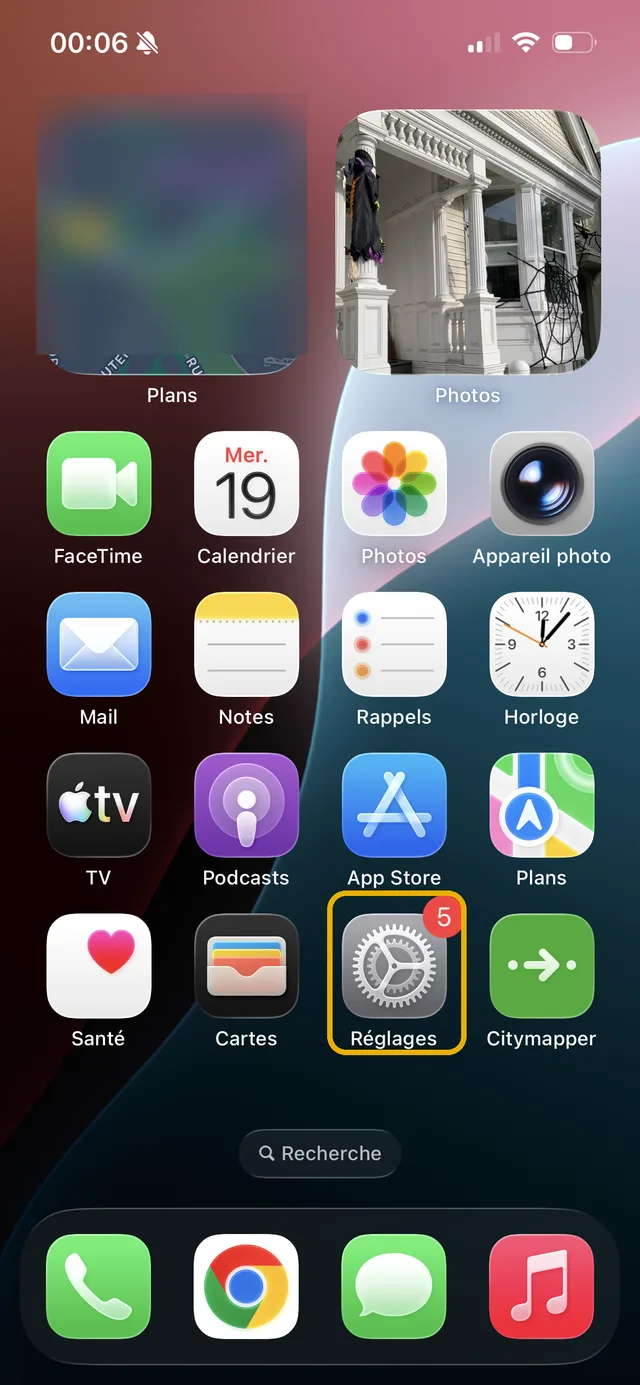
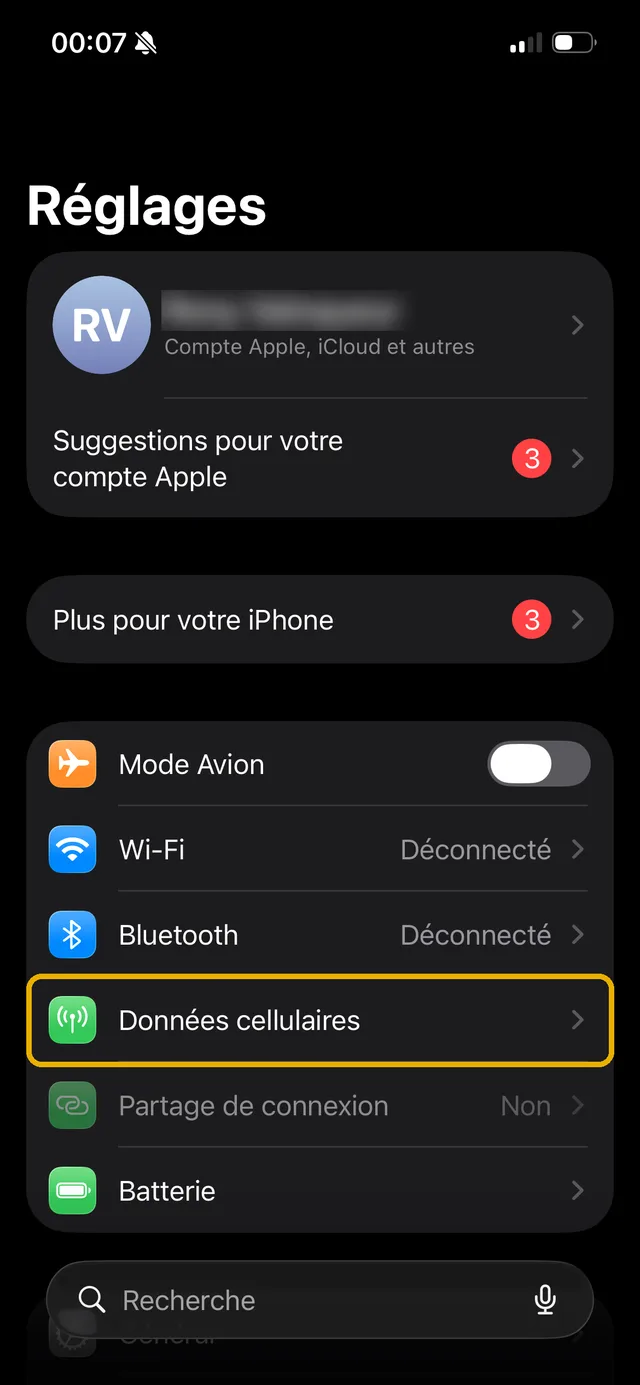
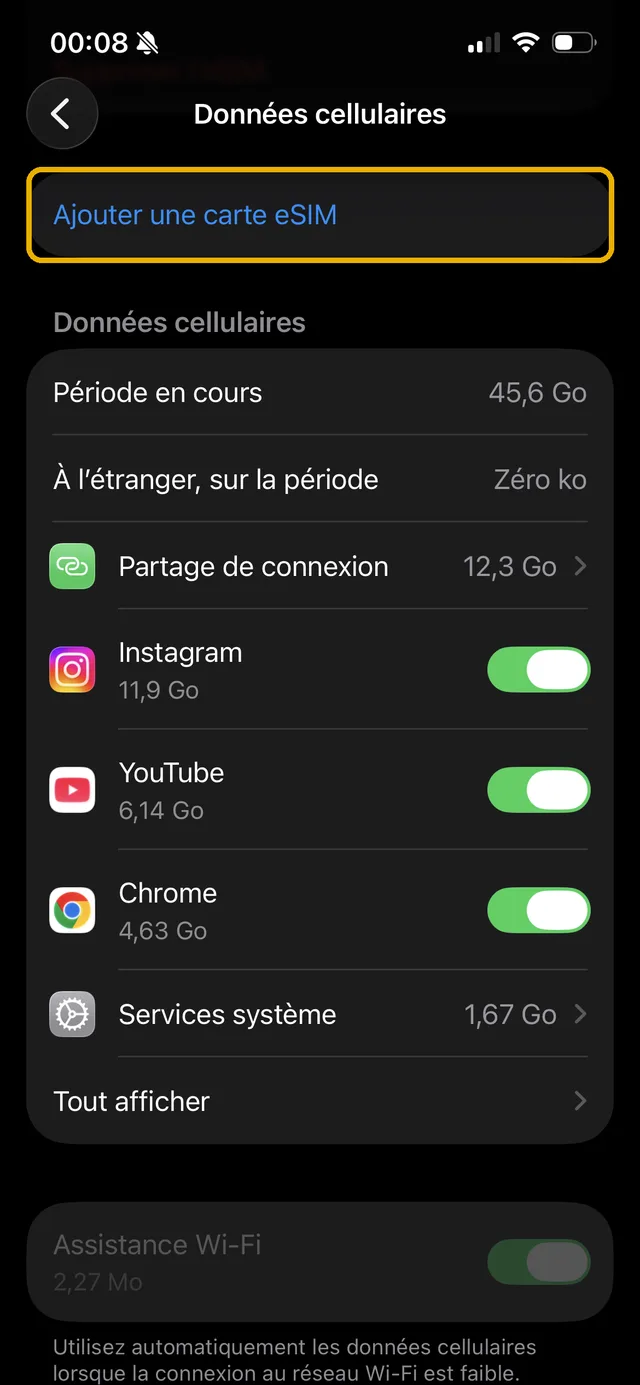
- Connect the iPhone to Wi-Fi, then open Settings > Mobile Data.
- Tap "Add eSIM", then "Use QR code".
- Scan the QR code received by email with the camera, then tap the "Mobile plan detected" notification. Tip: if the QR is displayed on the iPhone's own screen, a long press on it offers "Add eSIM" (iOS 17.4 and later).
- Name the line ("Travel", "Work"...) and choose which line carries mobile data. The profile downloads, the line appears in the settings: done.
Through the provider's app
- Buy your plan in the provider's app (carrier or travel eSIM).
- Tap "Install eSIM" in the app: the profile installs itself, with no QR code.
- Confirm the new line when iOS asks, then check which line is selected for mobile data.
By transfer from an old iPhone
- On the new iPhone, open Settings > Mobile Data > Add eSIM, then "Transfer from a nearby iPhone".
- Keep both iPhones unlocked side by side, Bluetooth on, and confirm the transfer on the old one.
- The line moves to the new phone and deactivates on the old one. Careful: prepaid travel eSIMs are often excluded from transfer, they stay tied to their first device.
By converting your physical SIM card
- Open Settings > Mobile Data, tap your current line, then "Convert to eSIM" (only visible if your carrier supports it).
- Confirm: the profile installs and the plastic card deactivates for good.
- Remove the card from the tray, it no longer serves. The tray is free for another card.
Activating an eSIM on Android
Labels vary slightly between brands (Samsung, Google Pixel, Xiaomi...), but the path is always the same:
Through the provider's app
- Buy your plan in the provider's app (carrier or travel eSIM), available on the Play Store.
- Tap "Install eSIM" in the app: the profile installs itself, with no QR code to scan.
- Confirm the new line when Android asks, then select it for mobile data.
Manually, in the settings
- Connect the phone to Wi-Fi, then open Settings > Network and internet (or Connections on Samsung).
- Tap SIM (or SIM card manager), then "Add eSIM" or "Download a SIM instead?".
- Scan the supplied QR code. If the scan fails, choose manual entry and type the activation code (SM-DP+ address) listed next to the QR.
- Enable the line when the phone offers it, then select it for mobile data.
- Check in the SIM settings that the line reads "eSIM": done. On Samsung, the per-model detail is on the official support page.
When travelling, add two settings after installation: enable data roaming on the eSIM line only (that is normal, it is the plan you paid for), and disable it on your home line to avoid any out-of-plan charge.
Activating an eSIM with a QR code (all brands)
The QR code is the universal method: the same flow works on iPhone, Samsung, Pixel, Xiaomi and the rest. The code is emailed to you right after purchase.
- Connect the phone to Wi-Fi and display the QR code on another screen (computer, tablet, or a printout). If it can only be displayed on the phone itself, use manual entry with the activation code supplied next to the QR.
- Open the SIM settings: Settings > Mobile Data > Add eSIM on iPhone, Settings > SIM > Add eSIM on Android, then pick the QR code option.
- Scan the code with the camera: the profile downloads and the line appears in the SIM list.
- Name the line, select it for mobile data on departure day, and keep the QR code in your inbox: some providers ask for it again on reinstallation.
An eSIM QR code works only once: once the profile is installed, the code is spent. Never delete the line "just to test", you would have to ask the provider for a reissue.
The rat's advice: always install your eSIM the day before departure, at home, on Wi-Fi. With most providers, validity only starts at the first connection on site. Scanning a QR code on dodgy airport Wi-Fi is the best way to start the holiday annoyed.
What are the advantages of the eSIM?
Instant activation
Your plan installs in two minutes, even on a Sunday night. No store, no post, no waiting: you buy, you scan, your line works.
Ideal for travel
You install a local plan before departure and land already connected, with no store to find and no queue. Your home line stays in place for calls and bank codes.
Several lines on one phone
Personal + work, or home line + travel plan: Dual SIM becomes trivial, and a recent phone stores eight or more profiles on standby.
Impossible to lose or break
No card to cut out, eject with a paperclip or misplace in a toiletry bag. The chip is in the phone, full stop.
Safer if the phone is stolen
A thief cannot pull the eSIM out of your phone like a physical card: the line stays active, which makes locating the device easier.
Greener
Zero plastic, zero blister pack, zero postal shipping. At the scale of billions of SIM cards produced every year, the difference is not symbolic.
What is the point of an eSIM?
Day to day, the main point is flexibility: switching carriers without waiting for a card, adding a work line without a second phone, converting your line to free up the SIM tray. But it is when travelling that the eSIM really changes the game: instead of paying your home plan's roaming at full price or hunting for a local SIM card on arrival, you buy a data plan for your destination online, install it before leaving, and it activates on landing.
That is exactly what our pages compare: eSIM plans from every provider (Airalo, Holafly, Saily, Ubigi, Nomad, voilà...), destination by destination, with hand-checked prices. To see what it costs in practice, head to the destination comparator or the page of compared eSIM providers.
What are the downsides of eSIMs?
Let's be honest, the technology has its limits too. None is a deal-breaker, but better to know them upfront:
- Changing phones is less instant. A physical card moves in ten seconds; an eSIM requires a transfer or a profile reinstallation, sometimes via the carrier.
- A profile is often single-use. Deleted by mistake, it cannot be reinstalled with the same QR code: you need a reissue, sometimes billed by certain carriers.
- Not every phone is compatible. Entry-level models and pre-2019 devices often go without, as do some regional variants (iPhones sold in mainland China, for instance).
- Not every carrier offers it. France's four major networks support it, but several budget MVNOs still only issue physical cards, as we detail in our article on eSIM at La Poste Mobile.
- Troubleshooting goes through the internet. Installing or reinstalling a profile requires a connection (usually Wi-Fi): with no network at all, you cannot bring a line back from scratch.
For everyday use, and especially for travel, these limits weigh little against the advantages: it is a trade-off you win comfortably, provided you follow one simple rule, never delete an eSIM profile unless you are sure you no longer need it.
How do I know if my phone is eSIM compatible?
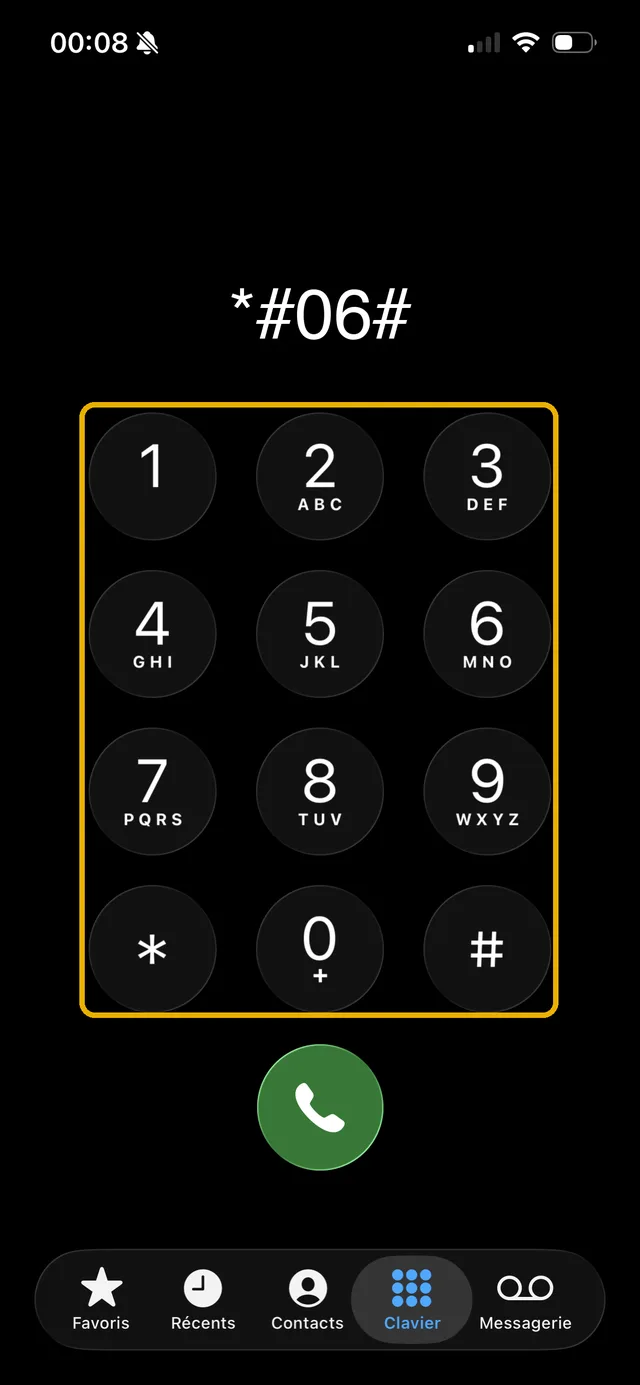
The universal test takes thirty seconds and works on iPhone and Android alike: dial *#06# on the call keypad. If a 32-digit EID number shows with the IMEI, your phone has the eSIM chip. If there is only the IMEI, it does not.
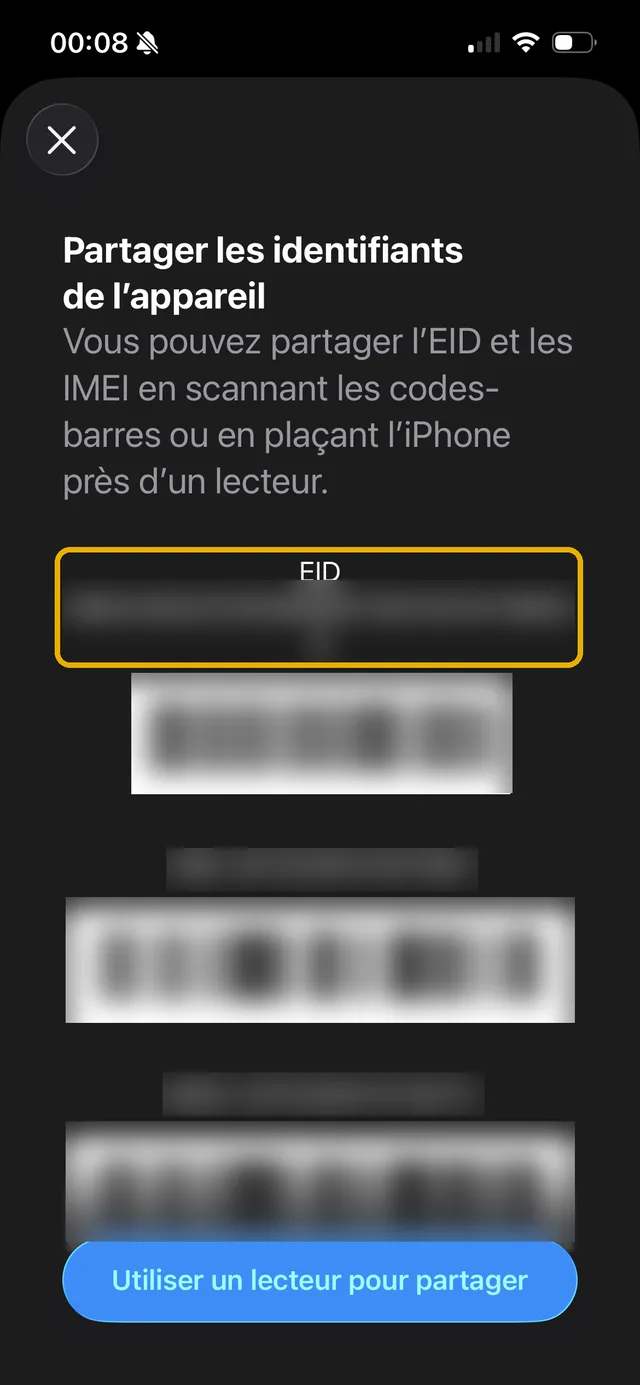
A second check lives in the settings: on iPhone, the "Add eSIM" option in Settings > Mobile Data; on Android, an "Add eSIM" entry in the SIM settings. And remember carrier unlocking: a phone locked to a carrier can refuse another provider's eSIM.
eSIM on iPhone: what is it?
On iPhone, the eSIM has been around since late 2018: every model since the iPhone XS, XS Max and XR supports it, SE 2020 and 2022 included. Since the iPhone 13, two eSIMs can be active at the same time, and the iPhone Air takes the logic all the way: sold without a SIM tray, it runs eSIM only, like the American models since the iPhone 14.
Apple also has the most polished features on the market: converting the physical card to an eSIM from the settings, transferring a line from one iPhone to another without contacting the carrier, and eight or more stored profiles. The full list, model by model with the traps by country of purchase, is in our eSIM compatible iPhone guide, and the detail of active lines in how many eSIMs on an iPhone.
eSIM on Android: what is it?
On the Android side, it is exactly the same technology, arriving with the Google Pixel 3 then spreading: Samsung Galaxy since the S20 (S, Z Fold, Z Flip series and some A models), Google Pixel since the Pixel 4, and the recent mid-range and high-end from Xiaomi, Oppo, Motorola, Sony, Honor or OnePlus. The only real difference with the iPhone: menu labels change from brand to brand.
Watch out, however, for the two Android-specific traps: the entry level (many Redmi and Galaxy A remain physical SIM only), and regional variants, the same model existing with and without eSIM depending on the country of sale. The *#06# test and our compatibility checker settle it in every case.
Ready to try? Pick your destination
The best way to understand the eSIM is to see what it costs for your next trip: plans compared provider by provider, prices checked by hand.
Frequently asked questions about the eSIM
The technology itself has no price: you pay for the plan, not the chip. At French carriers, activating or converting a physical card to an eSIM is often free, sometimes billed a few euros depending on the carrier and the context. At travel eSIM providers, the price is that of the prepaid plan, from €1 to €2 for a small data plan.
Yes, that is the principle of modern Dual SIM: the physical card keeps your usual number while the eSIM provides data, typically when travelling. Both lines are active at the same time, and you choose in the settings which one serves data, calls and texts.
It does not follow automatically. With a traditional carrier, you transfer the line (transfer feature on iPhone, or a new QR code from the customer area). For a prepaid travel eSIM, the profile generally stays tied to the first device: install it on the phone that is actually going on the trip.
Once installed and activated, yes: it connects to the mobile network like any SIM card. Only the profile installation requires a connection (Wi-Fi preferably), since the profile downloads from the carrier's servers.
No. An eSIM profile installs on a single device and a QR code only works once. Using the same profile on two phones at once is impossible, and most providers forbid reinstalling it once the profile is activated. Each device needs its own profile.
Not for your main line: converting your physical card to an eSIM keeps your number identical. Travel eSIMs, for their part, are generally data plans without a number: your usual number stays active on your other line, and WhatsApp keeps working with it, whatever SIM provides the connection.
Orange, SFR, Bouygues Telecom and Free all offer it, at sign-up as by conversion from the customer area. Among budget carriers it is uneven: Lebara and Prixtel offer it, Réglo Mobile only as a replacement, La Poste Mobile and Syma Mobile not yet. On the travel side, all the major providers (Airalo, Holafly, Saily, Ubigi, Nomad, voilà...) are 100% eSIM.
Now you know what an eSIM is? Find yours at the best price
Compare eSIM plans by destination: hand-checked prices, ranked by real price per GB.